Introduction to Computer System
By Notes Vandar
1.1 Introduction to Computer
A computer is an electronic programmable device that accepts raw data, processes it according to a set of instructions, and produces meaningful information as output. It can store data for future use and works with great speed and accuracy.
1.2 Characteristics of Computer
Speed: Computers can process millions, even billions, of instructions every second. This speed allows them to handle complex calculations and huge amounts of data much faster than any manual method. This makes them perfect for jobs that require quick data analysis or real-time processing, such as weather forecasting, online transactions, or gaming.
Accuracy: When given the right instructions, computers produce results without errors. They follow programs as instructed, without guessing or making mistakes. If errors do occur, they are almost always due to human mistakes in coding or data entry, not the computer itself. This condition is also known as GIGO (Garbage In, Garbage Out), which means accuracy is heavily dependent on how carefully we design and input information.
Automation: Once a program is started, a computer can work on its own without constant human control. This ability to automate tasks is especially useful for repetitive or complex processes, allowing people to focus on more creative or important work. For example, automation is used in manufacturing, banking, and data analysis to improve speed and consistency.
Storage Capacity: Computers can store massive amounts of information in a small physical space, far more than any paper-based method. They also make it easy to quickly search, retrieve, and update data. This is essential for everything from keeping personal files organized to managing huge company databases.
Versatility: One of the greatest strengths of computers is their ability to perform many different tasks. They can handle simple jobs like typing a document or doing calculations, as well as advanced tasks like 3D modeling, video editing, or running scientific simulations. Switching between these tasks is fast and seamless.
Connectivity: Computers can connect to networks, including the internet, allowing people to share data, communicate instantly, and work together from anywhere in the world. This connectivity powers everything from email and social media to cloud storage and video conferencing.
Multitasking: Modern computers can run several programs at the same time without slowing down. You can browse the internet, listen to music, and work on a document simultaneously, and the computer will keep each task running smoothly.
Diligence: Unlike humans, computers do not get tired, bored, or distracted. They can work nonstop for days, weeks, or even years, maintaining the same level of performance. This makes them ideal for long-term monitoring, data processing, or other tasks that need continuous attention.
1.3 Application of Computer
Entertainment: From streaming movies and music to online gaming, computers are central to modern entertainment. They power music composition with digital instruments, enable high-quality video editing, and support animation production. Creative tools also allow for easy photo editing, graphic design, and the creation of digital art and memes.
Industry: In industries, computers handle design work, simulate prototypes, control machinery, and manage inventories. They make online marketing possible, connecting businesses to customers in distant locations. Financial markets rely on computers for fast, accurate trading and analysis.
Education: Computers support online learning platforms, digital exams, and access to e-books and research material. They help educators use multimedia presentations, track student progress, and manage institutional records efficiently.
Government: Government agencies use computers for maintaining large citizen databases, automating services, and reducing paperwork. In defense, they play a key role in missile guidance, satellite control, GPS navigation, and security monitoring.
Business: Modern businesses depend on computers for accounting, data analysis, customer communication, and online sales. They streamline transactions and provide tools for market forecasting and strategic decision-making.
Banking: In banking, computers store account details, process transactions, and power ATMs. They also help detect fraud, maintain records, and ensure fast, error-free financial services.
Training: Companies use computer-based training systems to develop employee skills while saving travel and material costs. Video conferencing connects teams and trainers across different locations instantly.
Military Systems: Computers help track and control military assets like missiles, aircraft, and tanks. Radar, GPS, and AI-based targeting systems improve security and defense capabilities, while databases manage military personnel and logistics.
1.4 Classification of Computer
Computers come in a wide variety of shapes, sizes, and purposes. They are classified based on these factors.
a. On the Basis of Size and Speed
Supercomputers: These are the most powerful computers in terms of processing power, memory, and size. They can perform billions of instructions per second (BIPS) or even trillions of instructions per second (TIPS). They are also costly to build and manage and require special environments.
Examples: Google Sycamore, Fugaku, IBM Blue Gene, Gray XT5, CYBER 205, CRAY, and Param.
Mainframe Computers: These are the second largest and most powerful computers, designed to handle and process large amounts of data. Their processing capacity is measured in MIPS (Million Instructions Per Second) and they can handle thousands of users simultaneously. They are used by large organizations like banks, insurance companies, and government institutions for tasks such as transaction processing, large-scale enterprise applications, and database management.
Examples: IBM Z 15, Unisys ClearPath, Fujitsu GS21 series, IBM 4381, and UNIVAC (1100/60).
Minicomputers: Minicomputers are smaller, have lower processing speeds, and are cheaper than mainframe computers. They are still capable of supporting multiple users and handling medium-scale tasks. They are mostly used for manufacturing control, research labs, and medium-sized organizations that require fewer resources than a mainframe and need to support up to hundreds of users at once.
Examples: Prime series and AP3.
Microcomputers: Microcomputers are the smallest but most important category of computer systems for users. They are also referred to as Personal Computers (PCs).
- Desktop Computer: The most common kind of personal computer, which is a collection of different hardware devices like a monitor, keyboard, mouse, hard disk, and system unit.
- Laptop Computers: A small, lightweight computer that can be easily carried. It has a battery, making it more portable compared to a desktop computer. It also comes with a keyboard, trackpad, monitor, I/O ports, and other devices.
- Palmtop Computers or Personal Digital Assistant (PDA): A type of computer that is small enough to fit in a pocket and is often called a Personal Digital Assistant (PDA). Palmtops have a small keyboard and allow users to select icons using a special pen.
b. On the Basis of Working Principle
Digital Computers: A Digital Computer is a type of computer that represents and processes data using discrete, distinct values, primarily using the binary numbers i.e. 0 and 1. They perform calculations and logical operations with quantities represented as digits in the binary number system. Digital computers are general-purpose, programmable, and considered more reliable and accurate.
Analog Computers: Analog Computers are those that use continuous data to perform calculations. These computers use physical quantities such as voltage or current to represent data, rather than discrete binary values. Analog computers are typically special-purpose computers and have very low accuracy. Examples include thermometers, speedometers, and multimeters.
Hybrid Computers: Hybrid Computers are those that are capable of inputting and outputting both digital and analog signals. They are designed to leverage the strengths of both types of computers, making them highly useful in specific applications where both continuous and discrete data need to be processed simultaneously. For example, a patient monitoring system in a hospital measures heart rate (analog) and stores the data digitally.
c. On the Basis of Purpose
General-Purpose Computers: General-Purpose Computers are versatile machines designed to handle a wide variety of tasks, from simple calculations to complex operations. They can be programmed to perform numerous functions and are capable of running many different types of software applications. Their flexibility allows users to install, update, or replace software as needed, adapting to changing requirements. Examples include personal computers (PCs) and laptops.
Special-Purpose Computers: Special-Purpose Computers are built and optimized to carry out a specific task or a limited set of tasks. Unlike general-purpose computers, they cannot be reprogrammed to perform other functions. Because they are designed for a particular purpose, they are usually faster and more efficient in that area. These computers are often embedded within devices to provide dedicated control and operation. Examples include traffic signal controllers, ATM machines, and microwave ovens.
1.5 Mobile Computer
Mobile computing is the ability to use computing devices while being mobile, enabling communication and data access anywhere for users. It enables users to connect to networks, access information, and perform computing tasks without being tied to a special location. This technology relies on wireless communication and portable hardware to facilitate portable computing anywhere. E.g. Smartphones, tablets, etc.
1.6 Architecture of a Digital Computer
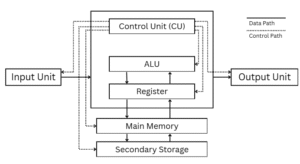
fig: Architecture of a Digital Computer
A digital computer is composed of four main components.
a. Input Unit
The Input Unit is used to take input from the user. Examples include a keyboard, mouse, and webcam.
b. Central Processing Unit (CPU)
The Central Processing Unit (CPU) is the brain of the computer. It helps the computer control and perform various arithmetic and logical calculations to carry out tasks. It consists of:
- Control Unit (CU): CU helps to directs the flow of data and instructions.
- Arithmetic Logic Unit (ALU): ALU performs all calculations and make logical decisions to perform any tasks.
- Register: Register is a small, high-speed temporary storage that the CPU can access directly for immediate processing.
c. Memory Unit
This unit helps the computer in storing data temporarily or permanently for processing.
d. Output Unit
The Output Unit is used to display the results provided by the computer after processing the data.
1.7 Memory & Its Classification
Memory refers to the electronic holding place for instructions and data that the computer’s microprocessor can quickly access. It is a hardware component where data, information, instructions, and programs are temporarily or permanently stored.
Memory is classified into two categories:
Primary Memory
Primary memory, also known as main memory, is the workspace for the processor. It is the main storage area where both data and instructions are stored for quick access by the CPU. The CPU continuously reads and executes instructions from the main memory.
There are two types of primary memory:
a. RAM: RAM stands for Random Access Memory. It is the memory that holds instructions and data that are frequently used during processing. RAM is also called volatile memory because the data is only retained as long as the computer has power; as soon as the electricity is cut off, the data disappears. Different types of RAM are given below:
- SRAM: SRAM stands for Static Random Access Memory. The word static indicates that the memory retains its contents as long as power is supplied.
- DRAM: DRAM stands for Dynamic Random Access Memory. It is called dynamic because it is unstable and must be constantly refreshed.
b. ROM: ROM stands for Read Only Memory. It is a primary memory that stores standard processing programs supplied by the manufacturer to operate the computer. A computer can only read the content of ROM but cannot change it. ROM is non-volatile memory because it doesn’t lose its content when the power supply fails. Different types of ROM are given below:
- PROM: PROM stands for Programmable Read Only Memory. It is a memory chip on which data can be written only once and remains forever.
- EPROM: EPROM stands for Erasable Programmable Read Only Memory. It is a special type of PROM that can be erased using ultraviolet light.
- EEPROM: EEPROM stands for Electrically Erasable Programmable Read-Only Memory. It is a type of ROM that can be erased and reprogrammed electrically.
Secondary Memory
Secondary memory, also known as auxiliary memory, is a long-term, permanent memory used in computers. It has a larger storage capacity compared to primary memory. Secondary memory devices, such as floppy disks and hard disks, cannot be directly accessed by the CPU.
Some of the popular secondary memory types are:
a. Magnetic Tape: A plastic-coated magnetic storage medium mainly used for backups. It has slower access times because the system must locate the correct section before reading or writing data.
b. Magnetic Disk: Circular storage plates made from metal or plastic, coated with a thin layer of magnetized material. They are widely used for efficient and reliable data storage. Examples include hard disk drives (HDDs) and floppy disks.
c. Optical Disk: An optical disk storage system consists of a rotating disk coated with a thin, highly reflective material. Laser beam technology is used for recording and reading data on the disk. The most commonly used optical disks are CD-ROM and DVD-ROM.
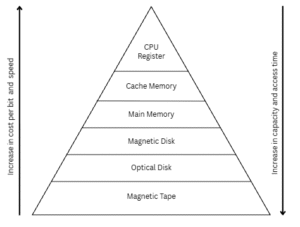
fig: Memory Hierarchy
1.8 Input devices
Input devices are hardware components that allow users to enter data and commands into a computer, enabling interaction between the user and the system. They serve as a bridge for communication between the computer and the outside world, allowing users to feed information, instructions, or control signals needed to perform various tasks. . Some examples of input devices are:
Keyboard: The keyboard is one of the important input devices used in computer. It contains various keys that enables us to enter alpha numeric data into a computer.
Mouse: The mouse is an input device that helps us to control the cursors position on the screen of computer. Mouse has a sensor at the bottom to locate the position of cursor and buttons to perform any actions. Pointing, click, double click, drag and drop, etc. are some of the operation a mouse can perform.
Light Pen: A pointing input device shaped like a pen, which uses a light-sensitive detector at its tip to interact directly with the computer screen.
OCR (Optical Character Recognition): A technology used to electronically detect and recognize printed or handwritten characters from scanned documents or images and convert them into machine-readable, editable text.
OMR (Optical Mark Recognition): A technology used to detect the presence or absence of marks made on paper forms or answer sheets. It is used for counting voting ballots and checking multiple-choice exam answer sheets.
MICR (Magnetic Ink Character Recognition): It is a technology used to read characters printed with special magnetic ink. It is used in the banking sector for reading checks.
1.9 Output devices
Output devices are hardware components that helps computer to display the result after the data processing is completed. They act as a bridge from the computer to the outside world, conveying information in forms such as text, images, audio, or video, allowing users to view, hear, or otherwise perceive the processed data. There are two types of output devices:
a. Softcopy output
Softcopy output refers to information produced by a computer in an electronic, intangible form that can be viewed or heard but not physically touched. This type of output is typically displayed on devices such as monitors, speakers, or projectors, allowing users to see text, images, videos, or hear sound. Softcopy output is dynamic and can be easily modified, updated, or erased without leaving a physical trace, making it ideal for interactive applications, presentations, and real-time data monitoring.
b. Hardcopy output
Hardcopy output refers to information produced by a computer in a tangible, physical form that can be touched and stored. This type of output is typically printed on paper or other media using devices such as printers or plotters. Hardcopy output provides a permanent record of data, documents, images, or reports, making it useful for official records, documentation, and situations where electronic viewing is not sufficient. Unlike softcopy, hardcopy cannot be easily modified once produced.
Printers are an example of hardcopy output and there are two types of printer and they are given below:
- Impact Printer: Printers which uses the electro-mechanical mechanism that causes hammers or pins to strike in a ribbon and paper to print the text are called impact printer. Its types are: Dot matrix printer, Daisy wheel printer and Drum printer.
- Non-Impact Printer: Printers which prints characters and images without striking a paper are known ask non-impact printer. Non-impact printer forms character and image without making direct physical contact between printing mechanism and paper. It produces high quality prints. Inkjet printer and laser printer are the examples of non-impact printer.
1.10 Interfaces
An interface refers to a point or connector through which data is transferred between two hardware devices. In a computer, there are different types of interfaces, including user interfaces, software interfaces, and hardware interfaces.
Some of the widely used interfaces are:
USB Port (Universal Serial Bus): USB ports helps to connect devices like flash drives, printers, cameras, and keyboards. They support plug-and-play and hot-swapping.
HDMI Port (High-Definition Multimedia Interface): HDMI helps to transfers high-quality video and audio from a computer to monitors, TVs, or projectors.
VGA Port (Video Graphics Array): VGA is an older port used to connect monitors and transmit analog video signals.
Ethernet Port (RJ-45): Ethernet port allows wired network connections for the internet or local area networks (LAN).
Audio Ports: Audio ports helps to connect speakers, headphones, and microphones to the computer.
Serial Port: Serial Port is an older interface used for devices like modems, mice, and industrial equipment.
Parallel Port: Parallel Port is used for printers and scanners, allowing multiple bits of data to transfer at once.
PS/2 Port: PS/2 Port is a legacy ports which were used for connecting keyboards and mouse.