Data Communication and Computer Network
By Notes Vandar
5.1 Introduction to communication system
Communication is the process of exchanging information, ideas, or messages between two or more people, machines, or systems. It requires a sender who delivers the message, a medium or channel through which the message is transmitted, and a receiver who interprets the message. A communication system is the complete arrangement that enables this exchange of information. It consists of an information source (sender), a transmitter that converts the message into a suitable form, a channel or medium such as air, cables, or radio waves through which the message travels, and a receiver that converts the signal back into understandable form for the destination. The system may also face noise or interference that distorts the message. For example, in a phone call, the speaker’s voice is the source, the microphone acts as the transmitter, mobile networks serve as the channel, the receiver’s phone speaker delivers the message, and the listener is the destination, while any static or poor signal acts as noise. It involves three main components:
Transmitter (sender): It sends the message in suitable form.
Medium: It carries signal from one point to another.
Receiver: It receives the data and interprets the message
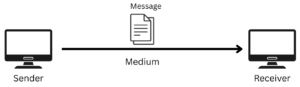
Fig: Communication System
5.2 Mode of Communication (Mode of Data Transmission)
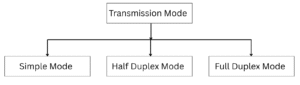
Fig: Mode of Communication
i. Simplex Mode
In Simplex mode, data transmission is unidirectional, meaning information flows only in one direction, from the transmitter to the receiver. One device exclusively sends data, while the other only receives it, similar to a one-way street. Since the channel capacity is entirely dedicated to a single direction, transmission is simple and efficient.
Common examples of simplex communication include a keyboard and monitor, where the keyboard sends input signals to the computer, and the monitor only displays output, or the transmission of data from a computer to a printer.
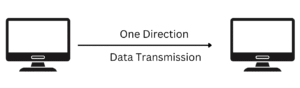
Fig: Simplex Mode
Advantages of Simplex Mode
- It is the most straightforward mode of communication, easy to implement and maintain.
- It requires only one communication channel, reducing setup and operational costs.
- Since only one side transmits, synchronization between devices is minimal.
- It is suitable for scenarios where feedback is unnecessary, such as broadcasting, public announcements, or surveillance systems.
Disadvantages of Simplex Mode
- Data cannot return to the sender.
- The sender has no confirmation that the receiver obtained the data correctly.
- Not suitable for interactive communication or systems requiring two-way data exchange.
ii. Half Duplex Mode
In Half-Duplex mode, communication is bidirectional, but only one direction at a time. This means both devices can transmit and receive data, but not simultaneously. When one device is sending, the other must wait to receive, similar to a walkie-talkie, where participants speak and listen in turns. The entire channel capacity is used for whichever direction is transmitting at a given moment.
Common examples of half-duplex communication include walkie-talkies and two-way radios, where both parties can exchange messages but must take turns.
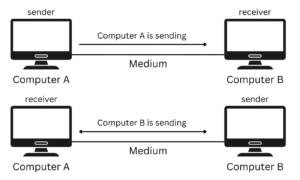
Fig: Half Duplex Mode
Advantages of Half-Duplex Mode
- Data can flow in both directions, though one at a time.
- It is more efficient as same channel is shared for sending and receiving.
- It requires only one communication path, reducing expense compared to full duplex.
Disadvantages of Half-Duplex Mode
- Devices cannot send and receive at the same time.
- Switching between transmission and reception may cause pauses.
- Devices must manage turn-taking, which adds complexity.
iii. Full Duplex Mode
In Full-Duplex mode, communication is bidirectional and occurs simultaneously. This means both devices can send and receive data at the same time, making it the most advanced and efficient mode of transmission. It can be compared to a two-way street, where traffic flows in both directions without interruption.
Common examples of full-duplex communication include telephones and modern computer networks, where both parties can talk and listen or exchange data at the same time.
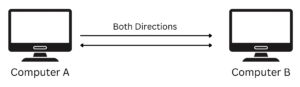
Fig: Full Duplex Mode
Advantages of Full-Duplex Mode
- It allows data flows in both directions at once, eliminating delays.
- It maximizes channel utilization by allowing continuous exchange of information.
- It is for real-time applications like voice calls and video conferencing.
Disadvantages of Full-Duplex Mode
- It requires two separate communication paths or more advanced equipment.
- It is more difficult to implement compared to simplex and half-duplex.
- It requires greater bandwidth and proper synchronization between devices.
5.3 Introduction to Computer Network
A computer network is a system in which two or more computers or devices are connected together to share resources, exchange data, and communicate with each other. The connection can be established through wired media or wireless media. Computer networks allow devices like computers, printers, mobile phones, and servers to interact, enabling resource sharing and efficient communication. Networks can vary in size and scope, ranging from a Local Area Network (LAN) within a building to a Wide Area Network (WAN) that connects systems across the globe, such as the Internet.
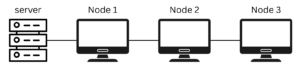
Fig: Computer Network
Advantages of Computer Network
- It is useful for sharing resources such as hardware, software, and data among multiple users.
- It is effective for communication, allowing users to exchange files, messages, and information quickly.
- It is cost-efficient since resources can be shared instead of duplicated for each user.
- It is helpful for centralized management, where data and applications can be controlled from one location.
- It is flexible and scalable, as new devices and users can be added easily.
- It is convenient for remote access, enabling users to work with files and systems from different locations.
Disadvantages of Computer Network
- It is vulnerable to security threats such as hacking, malware, and unauthorized access.
- It is costly to set up and maintain, especially for large or complex networks.
- It is complex to manage and requires skilled administrators for troubleshooting.
- It is risky because if the central server or main connection fails, the entire network may stop functioning.
- It is prone to misuse, as shared resources can be accessed improperly without proper monitoring.
5.4 Types of Computer Network
i. LAN (Local Area Network)
A Local Area Network (LAN) is a computer network that connects two or more devices within a small and limited geographical area, such as a home, office, laboratory, or school building. It is generally owned, controlled, and maintained by a single organization or individual. LANs are primarily used to enable communication among connected devices and to facilitate the sharing of resources such as files, applications, printers, and internet connections. Since the area covered is small, LANs usually provide high data transfer speeds and stable connections.
Features of LAN
- It offers high data transmission rates compared to larger networks like MAN or WAN.
- A LAN is usually owned and managed by a single organization, ensuring control over its operation.
- It enables users to share hardware devices, software applications, and files efficiently.
- The installation cost of a LAN is relatively inexpensive compared to wide area networks.
- A LAN can be managed from a central server, making it easy to monitor and control.
- Due to its limited coverage, a LAN provides stable and reliable communication with fewer chances of failure.
ii. Metropolitan Area Network (MAN)
A Metropolitan Area Network (MAN) is a type of computer network that covers a larger geographical area than a LAN but smaller than a WAN, usually spanning across a city or a group of nearby buildings. MANs are often established by internet service providers (ISPs), government agencies, or large organizations to connect multiple LANs within a metropolitan region. They use high-speed transmission technologies such as fiber optics to ensure efficient communication.
Features of MAN
- A MAN covers an entire city, town, or a large campus.
- It connects several LANs to form a larger network.
- MAN provides fast communication, often using fiber optic cables or wireless links.
- It can be owned by a single organization or managed by service providers.
- Since it covers a wider area, the setup and maintenance cost is higher than LAN.
- It allows organizations across a city to share data and resources.
- Reliability is lower compared to LAN, as the area covered is wider and more prone to faults.
iii. WAN (Wide Area Network)
A Wide Area Network (WAN) is the largest type of computer network that spans a very large geographical area, often covering countries or even continents. The best example of a WAN is the Internet, which connects millions of devices worldwide. WANs are usually managed by multiple organizations or telecommunication providers and rely on long-distance communication technologies such as satellites, undersea cables, and telephone lines.
Features of WAN
- A WAN can span across nations and continents.
- It connects multiple LANs and MANs into a global network.
- WANs are not usually owned by a single organization; instead, multiple providers manage them.
- WAN is the most expensive type of network to install and operate.
- It enables worldwide sharing of data, files, and resources.
- WANs are more prone to errors, delays, and security risks due to long-distance connections.
5.5 Network Topologies
Network Topology refers to the physical and logical arrangement of devices and connections within any computer network. It defines how computers, printers, servers, and other devices are connected and how data flows across the network. Understanding network topology is important because it affects the network’s performance, reliability, and ease of management.
Some of the common network topologies are:
i. Bus Topology
In a Bus Topology, all computers and devices are connected to a single central cable known as the backbone or bus. This cable acts as the main communication channel, and every message sent by a device travels across the bus and can be accessed by all other connected devices. To prevent signal loss or reflection at the ends of the cable, special devices called terminators are attached at both ends of the bus. This topology was widely used in early Local Area Networks (LANs), especially with coaxial cables.
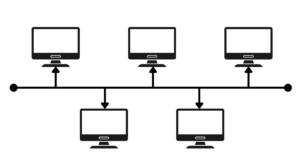
Fig: Bus Topology
Advantages:
- Connecting computers and devices is straightforward since all are linked to a single cable.
- Requires less cabling compared to star or mesh topologies, making it cheaper to implement.
- A new device or workstation can be added to the network without much difficulty.
- Works efficiently in small-sized networks where the number of devices is limited.
Disadvantages:
- If the backbone cable is damaged, the entire network goes down.
- Identifying and fixing faults or errors in the cable is time-consuming.
- Too many devices or a long cable can cause signal degradation and slow down the network.
- As more devices are added, data collisions increase, leading to slower communication.
ii. Ring Topology
In a Ring Topology, all computers and devices are connected in the shape of a closed loop or circle, with each workstation having exactly two neighbors. Data travels in one direction (unidirectional) or in both directions (bidirectional) depending on the type of ring network. A special signal called a token circulates in the network, and only the computer holding the token can transmit data. This ensures that each computer gets an equal opportunity to use the network resources.
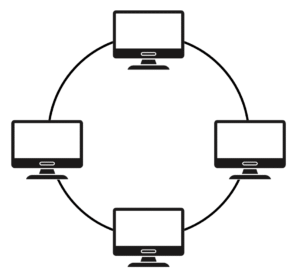
Fig: Ring Topology
Advantages:
- Easy to install and reconfigure
- Each computer gets equal access to the network through the token system.
- Data transmission is orderly, reducing chances of collision.
- Performance is predictable and consistent.
Disadvantages:
- Failure of a single computer or cable can disrupt the entire network.
- Error detection and troubleshooting are difficult.
- Adding or removing devices affects the whole network.
- Not suitable for large networks, as performance slows down with more devices.
iii. Star Topology
In a Star Topology, all computers and network devices are connected to a central device, such as a hub or switch, forming the shape of a star. The central device manages the communication between the connected devices and acts as the main point of control. Star topology is the most commonly used network topology in modern Local Area Networks (LANs) because of its simplicity and reliability.
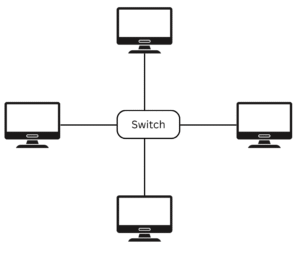
Fig: Star Topology
Advantages:
- Easy to install, set up, and manage.
- Failure of a single computer or its cable does not affect the rest of the network.
- Easy to expand the network by adding new nodes to the central device.
- Troubleshooting and error detection are simpler compared to bus or ring topology.
Disadvantages:
- Requires more cabling than bus topology, making it more expensive.
- Failure of the central device (hub or switch) leads to a complete network breakdown.
- Performance depends heavily on the capacity of the central device.
iv. Mesh Topology
In a Mesh Topology, every computer or device is directly connected to every other computer in the network. This provides multiple paths for data to travel, ensuring that if one connection fails, the data can still be transferred through another route. Mesh topology is highly reliable but also the most expensive topology to implement, since it requires a large number of cables and connection links.
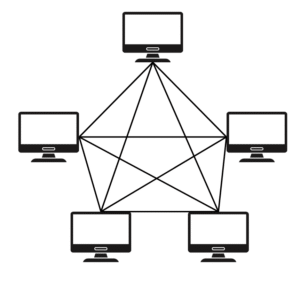
Fig: Mesh Topology
Advantages:
- Provides a direct connection between computers, making the network highly reliable.
- Data transmission is faster due to dedicated links between devices.
- Failure of one node or connection does not affect the overall network.
- Supports high security, as data can follow dedicated paths.
Disadvantages:
- Requires a large number of cables, making it expensive to implement.
- Complex structure makes it difficult to install, configure, and manage.
- Not suitable for small organizations due to high cost and complexity.
5.6 Transmission Media
Transmission media is the medium or path via which data signals travel from a sender to a receiver in a communication system. Transmission media determines the rate, reliability, and amount of communication. Transmission media is most often classified as guided (wired) and unguided (wireless).
i. Guided (Wired) Transmission Media
Physical wires are employed in guided transmission media for the transmission of signals from the sender to the receiver. Guided medium provides a clear path on which the signals can travel and is implemented in Local Area Networks (LANs) and wired networks.
Twisted Pair Cable: The most common type of guided media, it is made of insulated copper wires twisted into one another. Electromagnetic interference and crosstalk from other cables are reduced by the twist. Twisted pair cables are inexpensive to install, simple to operate, and widely utilized in phone lines and LAN connections. They have low bandwidth and are more prone to interference than other wired media.
Coaxial Cable: Coaxial cables have a copper conductor in the middle, wrapped by a metal shield, an insulation layer, and a protective cover layer. The design allows the cable to carry higher bandwidth signals and is less vulnerable to noise than twisted pairs. Coaxial cables are used in cable TV, broadband internet, and older Ethernet LANs. Coaxial Cables: Coaxial cables are primarily disadvantageous in terms of higher cost and less flexibility in comparison with twisted pair cables.
Fiber Optic Cable: Fiber optic cables utilize slender fibers of glass or plastic to carry data in the form of light signals. They provide extremely high data transfer rates and lose hardly any signal even over distances. Fiber optic cables are also not susceptible to electromagnetic interference, and so they are highly reliable. They are utilized for high-speed internet, long-distance telephony, and backbone networks. They are expensive and require specialized tools for installation and maintenance.
ii. Unguided (Wireless) Transmission Media
Unguided media transmit signals through the air, space, or vacuum without the inclusion of any physical cables. Unguided media are utilized in wireless networking, satellite communications, and mobile communication.
Radio Waves: Radio waves find application in broadcasting, Wi-Fi, and telephony on a very large scale. Radio waves travel for a very long distance and are capable of passing through walls and, hence, may be used to carry outdoor and indoor communications. Radio waves are susceptible to interference by other electronic equipment and can be attacked by security threats if not encrypted strongly.
Microwave Transmission: Microwaves are radio waves with high frequency and require a line-of-sight link between receiving and transmitting antennas. Microwaves are used in point-to-point communication, satellite communications, and long-distance telephone. Microwave transmission involves fast communication that requires open links and special equipment, which may be expensive.
Infrared (IR): Infrared transmission utilizes light waves in the infrared spectrum. It is commonly used in short-range communication, such as remote control, wireless keyboards, and IR data transfer among appliances. The infrared signal is safe and economical but short-range and does not pass through obstacles or walls.
Satellite Communication: Satellite communication is the propagation of signals to a satellite in orbit around Earth, and the satellite forwards the signal to the receiving organization on Earth. Satellite communication is applied for worldwide and far-distance communication like TV broadcasting, GPS, and internet connectivity. Satellites facilitate worldwide coverage but at great cost and with delay since the signals traverse a large distance.
5.7 Network Devices
A network device is a physical device used to connect computers and other devices within a network, enabling them to communicate and share resources. Network devices act as intermediaries that forward, manage, or regulate data traffic across the network. Some devices simply transmit data, while others perform more complex functions such as routing, translating protocols, or filtering traffic to ensure security and efficiency.
Common network devices include:
i. Hub
A hub is a basic networking device that connects multiple devices in a network, typically in a star topology. It receives data packets from one device and broadcasts them to all other connected devices, regardless of the destination. Hubs operate at the physical layer (Layer 1) of the OSI model and do not filter or manage traffic, making them simple but less efficient for large networks.
ii. Router
A router is a device that connects different networks and directs data packets between them. It determines the best path for data to travel from the source to the destination. Routers operate at the network layer (Layer 3) of the OSI model and are essential for connecting LANs to the Internet or linking multiple LANs together. Many routers also provide additional features such as firewall protection and wireless connectivity.
iii. Gateway
A gateway is a device that acts as a bridge between two different networks that use different protocols. It translates data from one protocol to another, allowing communication between networks that would otherwise be incompatible. Gateways can operate at multiple layers of the OSI model, depending on the complexity of the translation required.
iv. Network Interface Card (NIC)
A NIC is a hardware component installed in a computer or device that allows it to connect to a network. It provides a unique MAC address to identify the device on the network and enables data transmission and reception. NICs can be wired (Ethernet) or wireless (Wi-Fi) and operate at the data link layer (Layer 2) of the OSI model.
v. Modem
A modem (modulator-demodulator) is a device that converts digital signals from a computer into analog signals suitable for transmission over telephone lines or cable systems, and vice versa. Modems are used to connect a network or device to the Internet. They operate at the physical and data link layers and are essential for traditional broadband connections.
vi. Repeater
A repeater is a device that amplifies or regenerates signals in a network to extend the transmission distance. It is particularly useful in wired networks where signals weaken over long cables or in wireless networks to overcome obstacles. Repeaters operate at the physical layer (Layer 1) and do not process the data beyond signal boosting.
5.8 OSI Reference Model
OSI stands for Open Systems Interconnection. It is a conceptual framework developed by ISO (International Organization for Standardization) to standardize network communication. The OSI Reference Model provides a logical framework for designing and understanding network protocols, ensuring interoperability between different network systems.
The OSI model divides network communication into seven layers, each with specific functions, from the physical transmission of data to applications used by end-users.
i. Physical Layer
The physical layer is the lowest layer of the OSI model. It defines the physical and electrical characteristics of the network, such as cables, connectors, voltages, and data transmission rates. Its main function is to transmit raw bits over a physical medium and ensure that the signals are correctly sent and received.
ii. Data Link Layer
The data link layer provides reliable communication between two directly connected devices. It handles error detection and correction, organizes data into frames, and controls how devices access the shared medium. It also translates logical addresses into physical (MAC) addresses for proper delivery within a local network.
iii. Network Layer
The network layer manages communication between devices on different networks. It determines the best path for data delivery (routing) and translates logical addresses (IP addresses) into physical addresses. This layer is responsible for packet forwarding, routing, and addressing across interconnected networks.
iv. Transport Layer
The transport layer ensures end-to-end delivery of data between devices. It manages error checking, flow control, and data segmentation, and guarantees that data is delivered reliably and in order. Protocols like TCP (Transmission Control Protocol) operate at this layer.
v. Session Layer
The session layer establishes, manages, and terminates communication sessions between applications on different devices. It coordinates dialogue, maintains sessions, and ensures synchronization so that communication is orderly and continuous.
vi. Presentation Layer
The presentation layer acts as a translator for the network, converting data between different formats or encoding methods. It handles data encryption, compression, and formatting, ensuring that data sent from the application layer of one system can be understood by the application layer of another.
vii. Application Layer
The application layer is the topmost layer and defines network services for end-user applications. It provides interfaces for communication and data exchange between software applications and the network. Examples include email clients, web browsers, and file transfer applications
5.9 Communication Protocols
A protocol is a set of rules and standards that computers follow to communicate over a network. Without protocols, it would be impossible for devices to exchange data effectively. Protocols define how data is formatted, transmitted, received, and interpreted, ensuring that computers with different hardware and software configurations can communicate reliably.
Protocols are essential for establishing logical connections, managing data flow, and ensuring accurate and efficient delivery of information across networks. Different protocols serve different purposes, such as sending emails, transferring files, or browsing the web. Some of the most commonly used protocols include:
i. TCP/IP (Transmission Control Protocol/Internet Protocol)
TCP/IP is the foundational protocol suite for the Internet and most modern networks. It is responsible for addressing data, breaking it into packets, and routing those packets from the sender to the receiver across networks. TCP ensures reliable delivery, while IP handles logical addressing and routing.
ii. HTTP (Hypertext Transfer Protocol)
HTTP is used for transferring files and web pages on the Internet. When you access a website, HTTP defines how the request and response messages are formatted and transmitted between a web browser and a web server.
iii. FTP (File Transfer Protocol)
FTP provides a method for transferring files between two computers over a network. It allows users to upload, download, and manage files on remote servers efficiently, using either anonymous access or authenticated accounts.
iv. SMTP (Simple Mail Transfer Protocol)
SMTP is used for sending emails and attachments from a client to a mail server or between servers. It defines the rules for email transmission, ensuring that messages reach the correct destination reliably.
v. POP (Post Office Protocol)
POP is commonly used for fetching emails from a mail server to a user’s computer or email client. It allows users to download messages so they can be read offline. POP typically removes the email from the server once it is downloaded, though newer versions (like POP3) may allow leaving copies on the server.