Database Management System
By Notes Vandar
4.1 Introduction to DBMS
Database
A database is an organized collection of structured data, stored electronically in a computer system for easy access, management, and updating. It provides a centralized repository where data, such as numbers, text, images, or symbols, can be stored either in raw or processed form. Databases are typically arranged in rows and columns within tables, enabling efficient storage, retrieval, and manipulation of information.
They are vital for organizations as they support operations like digital libraries, reservations, and inventory management. A well-designed database ensures data integrity with rules and constraints, protects sensitive information through secure access controls, scales efficiently to handle large volumes of data, and enables meaningful analytics that guide better decision-making. For example: University database maintains information about students’ progress and grades in university.
Database Management System (DBMS)
A DBMS is software that manages and controls databases. It acts as a bridge between the database and its users or applications, ensuring secure, efficient, and consistent interaction with the stored data. Instead of directly dealing with raw files, users rely on a DBMS to create, update, query, and protect data. The DBMS organizes data using schemas and provides a database engine for efficient storage and retrieval. It supports concurrency, backup, recovery, and multiple views of data while ensuring independence from the physical storage structure. The most widely used type of DBMS is the Relational DBMS (RDBMS), which uses SQL to define, access, and manipulate data.
The purposes of DBMS are given below:
- It helps to manage data efficiently by storing, retrieving, and updating information in a systematic way.
- It helps to maintain data integrity and consistency by reducing redundancy and enforcing rules and constraints.
- It helps to secure data by providing controlled access and protecting sensitive information.
- It helps to support concurrent access so multiple users can work on the same database without conflicts.
- It helps to ensure backup and recovery so data can be restored in case of failure or loss.
- It helps to provide data independence by separating physical storage details from how users or applications view data.
- It helps to offer a centralized view of data with multiple user-specific perspectives while keeping information unified.
- It helps to simplify database administration through performance monitoring, auditing, change management, and automated logging.
4.2 Database Models
A. Implementation Model
These models describe how data is actually structured and implemented in database system.
i. Hierarchical Database Model
The Hierarchical Database Model organizes data in a tree-like structure, where each record has a single parent and can have multiple children. It is particularly useful for representing one-to-many relationships, such as a department with many employees or a company’s organizational chart. This structure allows for fast and efficient data retrieval when navigating parent–child relationships, making it ideal for certain transactional and reporting tasks. However, its rigid design makes it difficult to modify, extend, or reorganize data, limiting flexibility when relationships change or new requirements arise.
Advantages:
- Fast data retrieval for parent–child relationships.
- Clear and logical structure, easy to understand.
- Efficient for queries involving hierarchical data.
Disadvantages:
- Inflexible; difficult to modify or reorganize.
- Complex to implement for many-to-many relationships.
- Adding new fields or relationships can be challenging.
ii. Relational Database Model
The Relational Database Model organizes data into tables, called relations, consisting of rows and columns. Each row represents a record or entity, and each column represents an attribute of that entity. This model is widely used to implement relational databases, transforming conceptual designs from ER diagrams into practical, structured tables in systems like Oracle SQL, MySQL, and PostgreSQL. Relationships between tables are established using keys, allowing data to be linked logically and queried efficiently. For example, a STUDENT table may have attributes like ROLL_NO, NAME, ADDRESS, PHONE, and AGE, with each row representing a different student. Relational databases make it easy to understand, manage, and retrieve related data across multiple tables, providing a flexible and intuitive way to handle structured information.
Advantages:
- Simple and intuitive table-based structure.
- Supports powerful querying using SQL.
- Reduces data redundancy with normalization.
- Maintains data integrity using primary and foreign keys.
- Flexible and widely supported across database systems.
Disadvantages:
- Can become slow with very large datasets and complex joins.
- Requires careful design to avoid anomalies.
- Not ideal for hierarchical or graph-based data relationships.
- Performance may degrade with heavy transaction loads if not optimized.
iii. Object Oriented database model
The Object-Oriented Database Model (OODB or OODBMS) is a flexible database model that stores data in the form of objects, closely representing real-world entities. In this model, data and its relationships are encapsulated together within a single structure called an object, which can have multiple attributes and relationships with other objects. Object-oriented databases support abstract data types, classes, and complex data such as text, images, audio, and video. Some systems even allow storing procedures and rules along with the data, enabling advanced data processing. This model is particularly effective for representing complex real-world problems, providing intuitive organization, easier updates, and improved efficiency in data-driven applications.
Advantages:
- Represents complex real-world entities naturally.
- Combines data and behavior (methods) in a single structure.
- Supports multimedia and complex data types (audio, video, graphics).
- Allows better data organization and easier updates.
- Reduces data redundancy and improves integrity in complex systems.
Disadvantages:
- More complex design and implementation than relational databases.
- Requires specialized software and training.
- May have slower performance for simple queries compared to relational databases.
- Less standardized; fewer tools and community support compared to relational systems.
iv. Network Database Model
The Network Model in a Database Management System (DBMS) is a data model that organizes data using a graph structure of nodes (records) and edges (relationships), allowing more flexible and complex connections than the Hierarchical Model. Unlike the hierarchical model, it supports many-to-many relationships, where a record can have multiple parent and child records. Each relationship, called a set, consists of an owner record (similar to parent) and a member record (similar to child). Based on mathematical set theory, the Network Model is simple to construct and allows efficient and direct access paths between related records.
Advantages:
- Supports many-to-many relationships, offering more flexibility than the hierarchical model.
- Provides efficient data access through direct pointers.
- Logical connections between records are clear and organized.
- Reduces data redundancy by allowing multiple parent-child links.
Disadvantages:
- Complex structure; harder to design and maintain.
- Requires specialized DBMS software that supports network structures.
- Modifying the network (adding or removing records) can be challenging.
- Less intuitive for users compared to simpler models like the hierarchical or relational model.
B. Conceptual Model
The conceptual data model describes the database at a very high level. It is mainly used to understand the needs or requirements of the database before the actual design begins. This model plays a vital role in the requirement-gathering process, i.e., before database designers start making a particular database.
The conceptual data model is useful because it can be easily discussed with non-technical users and stakeholders. This helps gather requirements clearly and ensures that the design reflects real-world data needs.
One of the most popular conceptual data models is the Entity–Relationship (ER) model.
Entity–Relationship (ER) Model:
The ER model is a high-level data model that defines data and the relationships among them. It acts as a conceptual design of the database and provides a graphical representation that is simple to understand even for non-technical users. The ER model is built upon three main components: entities, attributes, and relationships.
i. Entity
An entity refers to a real-world object, person, event, or concept about which data needs to be stored. Entities can be tangible, such as a student, customer, or product, or intangible, such as a course, project, or department. In ER diagrams, entities are represented using rectangles.
Entities can be of two main types:
- Strong Entity: An entity that exists independently and does not depend on any other entity for its identification. For example, Student or Employee.
- Weak Entity: An entity that relies on a strong entity for its existence and identification. For example, Dependent of an employee or Order Item in relation to Order.
ii. Attributes
An attribute is a property or characteristic that describes an entity. Each entity has a set of attributes that help in defining and distinguishing it. For example, a Student entity may have attributes such as Roll Number, Name, Age, Address, and Marks. Attributes are represented in an ER diagram by ellipses or ovals.
Attributes can be further classified into types:
- Simple Attribute: These are indivisible attributes that cannot be broken down further, such as Age or Roll Number.
- Composite Attribute: These can be divided into smaller sub-parts with independent meanings. For example, Full Name can be split into First Name and Last Name.
- Derived Attribute: These are attributes whose values can be derived from other attributes. For instance, Age can be derived from Date of Birth.
- Multivalued Attribute: These attributes can have multiple values for a single entity. For example, a customer may have multiple phone numbers or email addresses.
iii. Relationships
A relationship defines the association between two or more entities and illustrates how they interact with each other in the database. For instance, a Doctor treats a Patient or a Student enrolls in a Course. Relationships are shown using diamond (rhombus) symbols in ER diagrams.
Relationships can be classified into different types:
- One-to-One (1:1): One entity instance is associated with exactly one instance of another entity. For example, a student has exactly one ID card.
- One-to-Many (1:N): One entity instance is associated with many instances of another entity. For example, one teacher can teach many students.
- Many-to-Many (M:N): Many instances of one entity are related to many instances of another. For example, students can enroll in many courses, and each course can have many students.
Advantages of ER Model
- Offers a clear and visual representation of data.
- Easy to understand for both technical and non-technical users.
- Useful for requirement gathering and communication.
- Organizes entities, attributes, and relationships clearly.
- Helps reduce data redundancy and supports normalization.
- Provides a blueprint for relational database design.
- Flexible and can be modified easily when requirements change.
Disadvantages of ER Model
- Becomes complex when dealing with very large systems.
- Does not capture all business rules and constraints fully.
- Cannot be directly implemented.
- Requires skilled designers to avoid errors.
- Not suitable for unstructured or real-time data.
- Lack of standardized notations may cause misinterpretation.
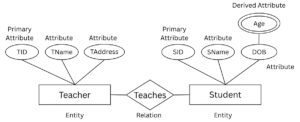
Fig: Example of ER-Diagram
4.3 SQL
SQL (Structured Query Language) is a programming language used to work with relational databases. It helps store, organize, and manage data in tables made up of rows and columns. With SQL, you can create databases and tables, insert new data, update or delete existing data, and retrieve specific information through queries. It also allows you to create views, stored procedures, and set permissions for better control and security. SQL is widely used because it makes handling structured data simple, efficient, and reliable. SQL command can be categorized as:
i. DDL
Data Definition Language (DDL) includes commands such as CREATE, ALTER, and DROP, which are used to define and modify the structure of a database. For example, the CREATE command is used to create new tables, databases, or other objects, ALTER modifies existing structures (like adding or removing columns), and DROP permanently deletes database objects.
ii. DML
Data Manipulation Language (DML) consists of commands like SELECT, INSERT, UPDATE, and DELETE that deal directly with the data stored in the database. SELECT is used to retrieve information, INSERT adds new records, UPDATE modifies existing records, and DELETE removes records. These operations are performed on the database tables to handle actual data.
iii. DCL
Data Control Language (DCL) provides commands such as GRANT and REVOKE, which control access to the database. GRANT is used to give specific permissions (like allowing a user to read or modify data), while REVOKE removes previously granted permissions. This ensures secure and controlled access to data.
iv. TCL
Transaction Control Language (TCL) includes commands like COMMIT and ROLLBACK, which manage transactions in the database. COMMIT is used to permanently save changes made during a transaction, while ROLLBACK undoes changes if something goes wrong. This ensures consistency and reliability of data by allowing safe execution of multiple operations as a single unit.
4.4 Database Design and Data Security
Database Design is the systematic process of planning and structuring a database to ensure that data is stored efficiently and logically. It often involves the use of Entity-Relationship (ER) diagrams to represent entities, attributes, and relationships within the system. Another important part of design is normalization, which organizes data into related tables to minimize redundancy and improve consistency. A well-structured database design makes data retrieval easier, improves performance, and reduces the chances of errors or anomalies in data handling.
Data Security refers to the practices and technologies used to protect data from unauthorized access, misuse, or loss. It ensures the confidentiality, integrity, and availability of data, often summarized as the CIA triad. Confidentiality keeps sensitive data hidden from unauthorized users, integrity ensures that data remains accurate and unaltered, and availability guarantees that data is accessible to authorized users whenever needed. Common methods of ensuring data security include authentication (verifying the identity of users), encryption (converting data into unreadable form without a key), and access control (restricting user permissions based on roles and needs).
4.5 Data Warehouse
Data Warehouse is a centralized storage system designed to hold large volumes of historical data collected from multiple sources such as transactional databases, applications, and external systems. It provides a unified platform where data is organized and structured for efficient querying and analysis. Data warehouses are primarily used for reporting and business analysis, helping organizations make informed decisions by providing insights into past performance, trends, and future opportunities.
4.6 Data Mining
Data Mining is the process of examining and analyzing large datasets to uncover hidden patterns, relationships, and trends that may not be immediately visible. By applying statistical techniques, machine learning, and database systems, data mining transforms raw data into meaningful information. It has various real-world applications such as market analysis (identifying customer preferences and sales trends), fraud detection (spotting unusual transactions or activities), and customer behavior prediction (anticipating buying habits and preferences). This helps businesses and organizations gain a competitive advantage through data-driven decision-making.
4.7 Database Administrator
A Database Administrator (DBA) is a professional responsible for managing, maintaining, securing, and ensuring the smooth operation of a database management system (DBMS). The DBA plays a crucial role in controlling how data is stored, retrieved, and protected, making sure that databases run efficiently and reliably. In addition to maintaining performance, DBAs collaborate with developers to design and implement new features, resolve issues, and align database systems with both technical requirements and business needs.
In today’s information-driven world, the role of a DBA is becoming increasingly important as organizations rely heavily on data for market analysis, decision-making, and strategic planning. With the rapid growth of cloud computing and data-centric business models, the demand for skilled DBAs continues to rise globally.
Responsibilities of a Database Administrator (DBA)
- Designs and implements databases by creating schema, tables, fields, and relationships.
- Installs and configures DBMS software and ensures smooth database implementation.
- Manages data integrity and security by controlling access, authentication, and user permissions.
- Monitors and tunes database performance to improve query speed, accuracy, and efficiency.
- Performs regular backups and ensures recovery procedures to minimize the risk of data loss.
- Supervises system operations by handling errors, restart, and recovery during failures.
- Reorganizes databases to enhance performance and maintain efficiency.
- Provides user support and training to help developers and end-users interact effectively with the database.
- Manages hardware and storage resources to ensure cost-effective and efficient database operations.
- Ensures availability and reliability of the database for business continuity.