Operating System
By Notes Vandar
3.1 Introduction to Operating System
An Operating System (OS) is a system software that manages all the resources of a computer system. It acts as an interface between the user, application software, and the computer hardware. The OS controls and monitors the execution of all other programs, including application software and system utilities, and ensures smooth overall operation of the device.
The operating system is responsible for managing memory, processes, files, and input/output devices such as disk drives, printers, keyboards, and displays. Its kernel contains the core components that directly interact with the hardware. Without an operating system, a computer cannot function because users would have no way to communicate with the hardware.
The primary purposes of an operating system are to:
- Enable applications to interact with computer hardware.
- Manage hardware and software resources effectively.
- Provide a user interface (graphical or command-line) for communication with the system.
Operating systems are found not only in personal computers but also in mobile phones, tablets, mainframe computers, automobiles, televisions, and even smart devices like toys. Examples of popular operating systems include Windows, Linux, macOS, Android, iOS, VMS, OS/400, AIX, and z/OS.
3.2 Function of Operating System
I/O Management
I/O Management is an essential function of an operating system that controls all input and output operations, ensuring smooth communication between hardware devices and software applications. It uses techniques like device drivers, buffering, caching, spooling, and interrupt handling to provide efficient data transfer, coordination, and error handling. By abstracting hardware complexities, the OS allows applications to perform I/O tasks without dealing with device details. In systems like Linux, I/O management is handled through the kernel and device drivers, enabling administrators to optimize and troubleshoot I/O performance.
File Management
File Management is an important function of the operating system that organizes and controls how data is stored and accessed on a computer. The OS manages tasks such as creating, opening, reading, writing, and deleting files, as well as arranging them into directories for easy navigation. It also controls file permissions, deciding who can view, edit, or delete a file, which helps protect data from unauthorized access. The file system stores information about each file, like its name, size, and creation date, allowing quick and efficient access. In this way, the operating system acts like a project manager, keeping files organized, providing resources when needed, and ensuring everything stays in order.
Memory Management
Memory Management is one of the most important functions of an operating system, as it controls and optimizes the use of a computer’s main memory. Before a program can run, it must first be loaded into memory, and the OS decides how much space to allocate for it. The OS keeps track of which parts of memory are being used, which are free, and which process is allowed to use them. It also handles memory allocation when a process needs space and deallocation when it finishes. To ensure stability and efficiency, techniques like paging and segmentation are used so that each process gets its own safe memory space. This prevents conflicts, allows multiple programs to run smoothly at the same time, and makes sure no single process slows down the system by using too much memory.
Device Management
Device Management is one of the major functions of the operating system that controls and coordinates all hardware devices connected to the computer. It uses device drivers to enable communication between the OS and peripherals like keyboards, mice, printers, and storage devices. The OS manages device requests, allocates resources, and oversees data transfers to ensure devices work efficiently without conflicts. It also provides a standard interface so applications can use devices easily, regardless of their type or brand. Through device management, users can configure device settings, install updates, and maintain security, while the OS ensures multiple devices operate smoothly at the same time.
(Note: It might look similar to I/O management but I/O management helps to efficiently transfer data between hardware and software where as Device management helps in controlling and coordination of the hardware devices themselves.)
Process Management
Process Management is an important function of the operating system that controls the execution of programs, also called processes. It manages the entire lifecycle of a process, including creating, scheduling, and terminating it, while ensuring efficient use of the CPU. The operating system decides which process gets processor time, how long it runs, and when it should pause to let other processes execute, a technique known as scheduling. It also provides mechanisms for process synchronization and communication so that processes can work together without conflicts. By allocating and deallocating resources fairly and securely, the operating system prevents any single process from overusing the CPU or memory, maintains system stability, and ensures that all applications run smoothly in a multitasking environment.
Security Management
Security Management is also one of the functions of operating system that protects the computer and its data from unauthorized access, misuse, and damage. It ensures that system resources, files, and information remain safe from threats such as viruses, malware, and hacking attempts. The operating system uses techniques like authentication to verify user identity, authorization to control access to resources, and cryptography to secure sensitive data. By managing security effectively, the OS keeps the system and its information safe while allowing authorized users to access and use resources efficiently.
3.3 Types of Operating System
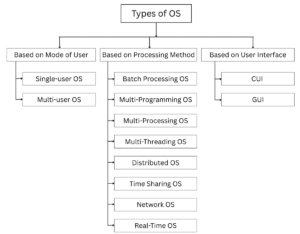
Fig: Types of OS
A. Based on Mode of User
1. Single-user Operating System
Single-user Operating System is designed for use by one person at a time, typically on home or personal computers. It allows a single user to access all the resources of the computer, such as the CPU, memory, and I/O devices. While it may support multiple user profiles, only one user can work at a time. These operating systems do not require advanced memory protection, file protection, or complex security systems. They usually run a single program at a time on a single processor. The core of a single-user OS consists of one kernel image, meaning it cannot run multiple kernels simultaneously or allow multiple users to interact with the system at the same time. MS-DOS is an example of single-user OS.
2. Multi-user Operating System
Multi-User Operating System allows multiple users to access a computer system simultaneously. Each user can work independently without affecting others, as the OS manages and allocates resources like CPU time, memory, and I/O devices among all active users. This type of operating system provides features such as user authentication, file protection, and security controls to ensure that each user’s data and processes remain safe and private. Multi-user operating systems are commonly used in servers, mainframes, and networked environments, where several users need to run programs and access shared resources at the same time. UNIX and LINUX are the examples of multi-user OS.
B. Based on Processing Method
1. Batch Processing OS
Batch Processing Operating System is a type of OS where jobs are collected and executed in batches without user interaction during execution. Popular in the 1970s, it efficiently processes large volumes of data by grouping similar jobs together. Users submit jobs offline, and the OS schedules and executes them one by one, reducing setup time and increasing speed. Batch OS provides tools for task scheduling and monitoring, and is ideal for applications where multiple users work independently without interfering with each other.
2. Multi-Programming OS
Multiprogramming Operating System is a type of OS that allows multiple programs to be loaded and run in memory at the same time on a single processor. Unlike single-tasking systems, where the CPU may stay idle while a program waits for input/output, multiprogramming assigns the CPU to other programs during such waiting periods. This improves CPU utilization, reduces idle time, and increases overall system performance. The OS uses techniques like context switching, buffering, and spooling to manage CPU and I/O tasks efficiently. By allowing several programs to share the CPU and system resources, multiprogramming ensures that tasks run smoothly and the system remains responsive, providing better throughput and faster execution of jobs.
3. Multi-Processing OS
Multiprocessing Operating System is an operating system that uses two or more processors within a single computer system to execute multiple programs simultaneously. Each processor can execute a different task at the same time, thus increasing system speed, efficiency, and reliability. The operating system takes care of the processor allocation, task coordination, and making sure that all the processors are efficiently sharing the system resources. Multiprocessing operating systems are especially suitable for handling complex computations, large applications, and high-availability and high-performance environments. With parallel execution of several processes, multiprocessing realizes full CPU utilization and increases system throughput.
4. Multi-Threading OS
Multithreading Operating System is a type of OS that allows a single program or process to be divided into multiple threads, which can run concurrently. Each thread represents a separate task within the same program, sharing the same memory space but executing independently. This improves the efficiency and responsiveness of applications, as threads can perform different operations at the same time, such as processing data while waiting for input/output. Multithreading reduces CPU idle time, enhances performance, and is commonly used in modern applications like web browsers, servers, and multimedia programs to handle multiple tasks simultaneously.
5. Distributed OS
Distributed Operating System is a type of OS that manages a group of independent computers and makes them appear to users as a single, unified system. It allows multiple computers to share resources, such as processors, memory, and storage, while coordinating tasks across the network. The OS handles communication, synchronization, and resource allocation to ensure that all computers work together efficiently. Distributed operating systems improve reliability, scalability, and performance, and are commonly used in networks, cloud computing, and large-scale applications where tasks are executed across multiple machines simultaneously.
6. Time Sharing OS
Time Sharing Operating System is a type of OS that allows multiple users to access a computer simultaneously by sharing CPU time. The CPU switches quickly between users or tasks, giving each the impression of having a dedicated processor. This system reduces waiting time, improves responsiveness, and allows interactive use of the computer. Time-sharing OS uses techniques like scheduling and multitasking to manage multiple users and processes efficiently. It is commonly used in servers, mainframes, and networked environments where several users need to run programs at the same time without affecting each other.
7. Network OS
Network Operating System is a type of OS that manages and coordinates computers connected in a network, allowing them to share resources like files, printers, and internet connections. It provides security, user authentication, and access control to ensure that resources are used safely and efficiently. The OS handles communication between computers, manages data transfer, and allows multiple users to access shared resources simultaneously. Network operating systems are commonly used in offices, schools, and organizations where several computers need to work together over a network.
8. Real-Time OS
Real-Time Operating System (RTOS) is a type of OS designed to process data and respond to inputs immediately, often within a strict time limit. It is used in applications where timing and reliability are critical, such as embedded systems, medical devices, robotics, and industrial machines. RTOS ensures that high-priority tasks are executed without delay, manages multiple tasks efficiently, and maintains predictable and consistent system performance. By handling time-sensitive operations accurately, a real-time OS ensures the system reacts quickly and correctly to external events.
C. Based on User Interface
1. Character User Interface (CUI)
Character User Interface (CUI) is a text-based interface where users interact with the computer by typing commands using a keyboard. CUI is faster and consumes less memory than GUI, but it is less intuitive, supports only keyboard input, and requires users to memorize commands. It usually allows only one task at a time and provides minimal feedback, making it less user-friendly for beginners. Examples of CUI include MS-DOS, Windows Command Prompt, and UNIX. CUI is efficient in terms of speed and resource usage but demands more expertise from the user.
2. Graphical User Interface (GUI)
Graphical User Interface (GUI) is a type of user interface where users interact with the computer through graphics, icons, windows, buttons, and navigation bars. It is highly user-friendly and requires no special expertise, allowing users to perform tasks easily and run multiple programs at the same time. GUI uses pointing devices like a mouse to navigate and customize the interface. However, it requires more memory, higher processing power, and takes longer to develop compared to text-based interfaces. Examples of GUI include Windows and macOS.
3.4 Open-Source Operating System
An Open-Source Operating System is an operating system whose source code is publicly available to everyone. This means that any user with the required technical knowledge can view, use, modify, and redistribute it freely. Unlike closed-source operating systems such as Microsoft Windows, Mac OS, or Apple iOS, where the source code is hidden and cannot be changed, open-source systems promote transparency, collaboration, and flexibility. They allow programmers and organizations to customize the OS according to their needs, making them widely used in both personal and enterprise environments. Some popular examples of open-source operating systems are Linux, Ubuntu, and Android.
Some of the benefits of Open-Source OS are:
- Users get full access to the source code.
- The system can be customized to specific needs.
- Modified versions can be shared with others.
- Community collaboration makes it more reliable.
- Most are free, making them cost-effective.
- They provide great learning opportunities for programmers.
- Strong community support is available for users.